- DATE:
- AUTHOR:
- Toast product communications
Links

Tip entry lines accurately display configured tip labels
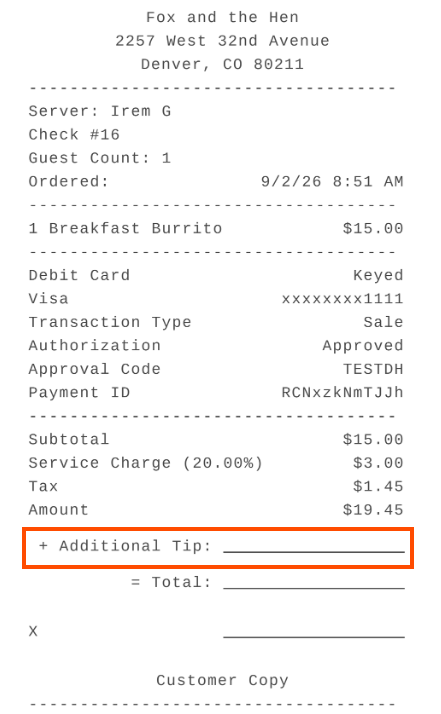
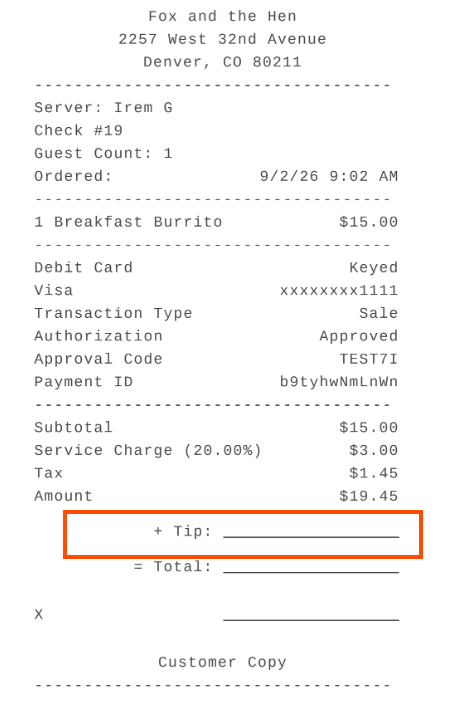
Previously, when gratuity had already been applied to a check, the tip entry line on guest receipts always printed "Additional Tip" even at locations configured in Guest Receipt Setup to use the Tip label. Tip entry lines now use the label selected in Guest Receipt Setup (Finance > Settings > Guest receipt setup). Receipts printed after payment already used the selected label and are unchanged.
For more information about managing tips, see this Toast Support article.
Before this fix
After this fix
How to verify
To verify this fix,
open the Guest Receipt Setup page in Toast Web (Finance > Settings > Guest receipt setup)
Select Use "Tip" text for the Tip Line with Gratuities setting.

Apply a gratuity to a check, then print the tip entry receipt before the check is paid. The tip entry line reads "Tip" rather than "Additional Tip."
Availability:
First available in Toast POS version 2.117.
Countries affected:
All
Links