- DATE:
- AUTHOR:
- Toast product communications
Links

Estimate guest count from the items ordered with calculated guest count
Calculated guest count estimates the number of guests on each order based on the items ordered. You assign a guest count weight to menu items and modifiers (for example, 1 for an entree and 0.5 for a shared appetizer), and the Toast platform calculates and updates the guest count for each order. Fractional weights let shared items, sides, and partial portions count as part of a guest.
Set item weights in the Guest Count Weight column in the menu manager (Menus > Menu management > Menu manager). For more information about configuring an item weight, see Configuring guest count weights.
When you enable calculated guest count in Toast Web (Reports > Settings > Metric configurations), the Toast platform checks your configuration and flags incomplete setup.
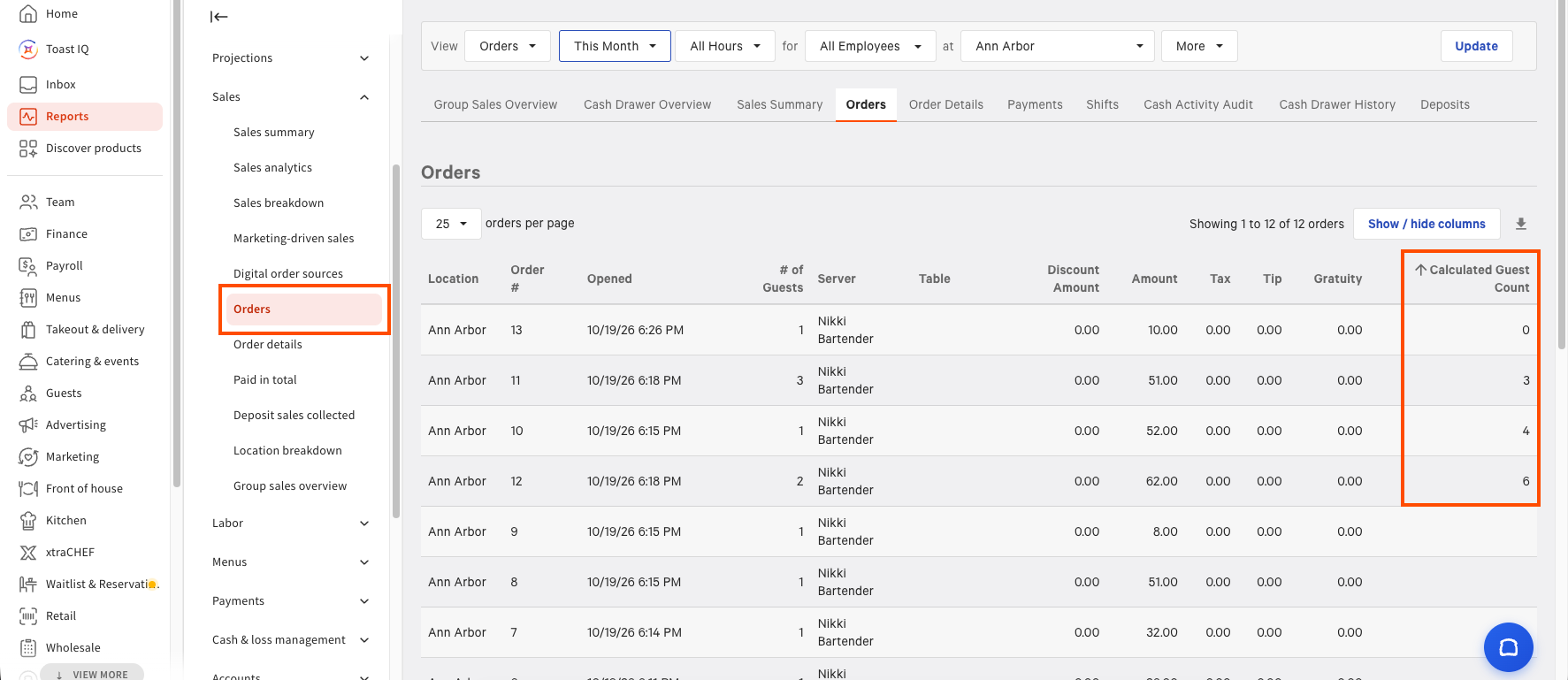
Calculated guest counts appear alongside the POS guest count that employees enter. POS Guest Count and Calculated Guest Count both appear in orders, item and modifier details, data exports, custom reports, and the sales summary reports in Toast Web.
For more information, see Calculated guest count.
The following image shows the Calculated Guest Count column in the orders report in Toast Web.
How to verify
Turn on calculated guest count in Toast Web, then assign guest count weights to menu items in the menu manager and publish your changes. Complete an order that includes those items. The order reporting in Toast Web shows both POS Guest Count and Calculated Guest Count.
Availability
This change is rolling out to Toast locations starting November 9, 2026.
Affected countries
All
Links