- DATE:
- AUTHOR:
- Toast product communications
Links

Match any or all filters and combine filter groups in Guestbook
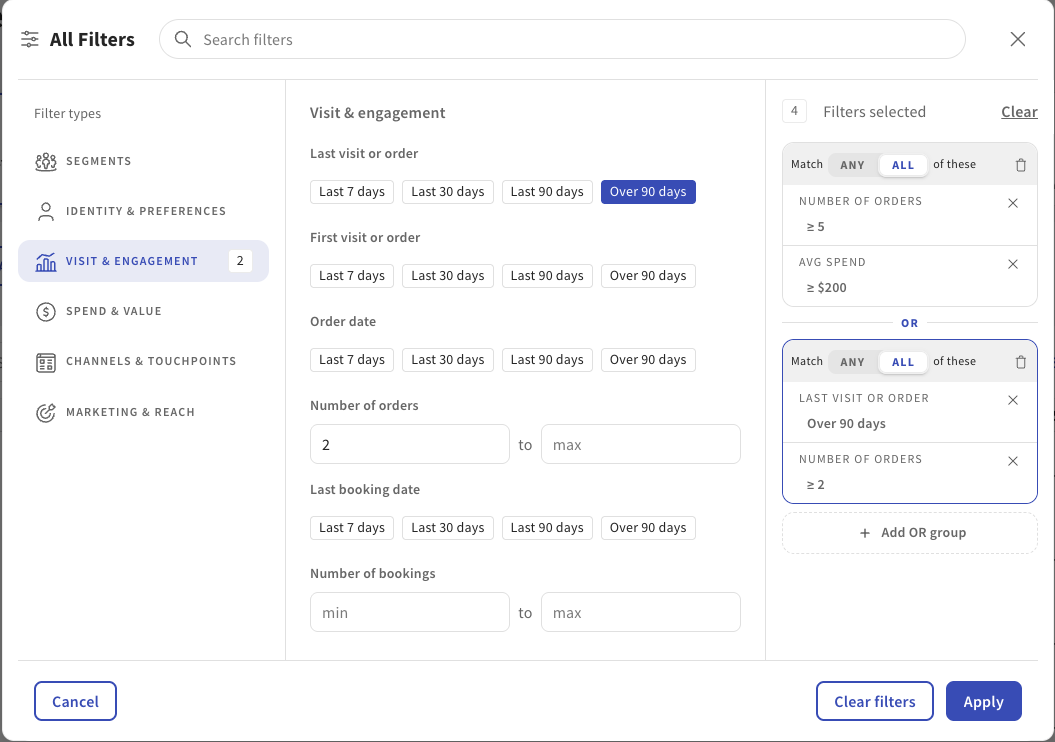
You can now choose whether guests in Toast Guestbook must match ALL or ANY of your selected filters. Previously, filters always used ALL, so a guest had to meet every condition. With ANY, you find guests who meet at least one condition.
You can also use Filter Groups to combine multiple sets of filter criteria with OR logic. For example, to find guests who are either high-value regulars or recently lapsed:
(Number of Orders ≥ 5 AND Avg Spend > $200) OR (Last Order was more than 90 days ago AND Number of Orders ≥ 2)
For more information, see this video walkthrough.
How to verify
In Guestbook, select two or more filters and switch from ALL to ANY. The results include guests who match at least one filter. Then create two Filter Groups. The results include guests who match either group.
Availability
This change is available to all Toast locations who use Guestbook.
Affected countries
All
Links